
December 01, 2025 • 9 min read

December 01, 2025 • 9 min read
It's early December. Christmas is few days away. Your competitors have been running holiday ads for weeks. You? You haven't even started.
Sound familiar?
Here's the thing: Holiday shopping season is already underway, with consumers spending over $900 billion on Christmas gifts annually. Your competitors are capturing that attention right now. You're overwhelmed—thinking you need a designer, photographer, copywriter, and weeks of production time.
You don't have weeks.
What if you could create professional Christmas ads in under 5 minutes? No designer. No photoshoot. Just you, your existing ad, and AI.
By the end of this article, you'll have created your first Christmas ad. Actually created it—not just learned about it. The process takes 3 steps and less than 5 minutes.
Let's get your holiday campaign running before your competitors capture all the attention.
Holiday shopping accounts for 20-30% of annual retail sales. According to the National Retail Federation, 60% of consumers start shopping in November, and Christmas ad spending increases by 30-40% in Q4. Average order values are 25% higher during holidays.
Higher Purchase Intent: People are actively looking for gifts with budgets already allocated. Decision-making is faster during the holiday season.
Emotional Connection: Holiday nostalgia drives clicks. The gift-giving mindset reduces price sensitivity, and festive visuals stand out in crowded feeds.
Clear Deadline Creates Urgency: "Order by Dec 15 for Christmas delivery" provides natural scarcity without being pushy. Time-bound offers convert better than open-ended promotions.
Less Ad Fatigue: Seasonal creative feels fresh and different from year-round messaging. Viewers expect and welcome holiday content.
Timeline Breakdown:
• Late October - Early November: Early adopters start
• Mid-November: Majority of brands launch → YOU ARE HERE
• Late November - Early December: Peak shopping begins
• Mid-December: Last-minute shoppers (huge segment!)
• Dec 20-24: Desperate last-minute buyers (digital gifts, gift cards)
If you launch this week, you'll catch the peak shopping period from Black Friday through December 20. That's 4+ weeks of high-intent buyers. More than enough time to generate serious revenue.
Don't let perfectionism delay your launch. A good Christmas ad running today beats a perfect ad running next week.
Color Psychology:
• Red & Green: Traditional, instantly recognizable as Christmas
• Gold & White: Luxury positioning, premium gifts
• Blue & Silver: Modern, winter elegance
• Red & White: Nostalgic warmth
Imagery That Resonates:
• ❄️ Snow and winter scenes
• 🎁 Gift boxes with ribbons
• 🎄 Christmas trees and decorations
• ✨ Lights and sparkle effects
• 👨👩👧👦 Families and togetherness
Headline Formulas That Work:
Gift-Focused:
• "The Perfect Gift for [Audience]"
• "They'll Love This 🎁"
• "Give the Gift of [Your Product]"
Urgency-Driven:
• "Order by Dec [X] for Christmas Delivery"
• "Last Chance for Holiday Shipping"
• "Only [X] Days Until Christmas"
Discount/Offer:
• "Our Christmas Gift to You: [X]% Off"
• "Santa's Special: Save [Amount]"
• "Holiday Sale: [Offer]"
Emotional:
• "Make Their Christmas Magical"
• "Because They Deserve It"
• "Create Christmas Memories"
Now comes the exciting part. You're going to create your first Christmas ad in the next 5 minutes. Set a timer if you don't believe me.
What You'll Need:
• A Vibemyad account (free 7-day trial, no credit card)
• One of your existing ads
• 5 minutes
Why This Process Works: Instead of starting from scratch, we're transforming an ad you know works. Your existing ad has already proven it can capture attention and drive clicks. We're just giving it a Christmas makeover.
Log into Vibemyad and navigate to your ad library. You'll see all the ads you've liked or saved from competitor research, plus any ads you've created.
What to Look For:
Option A: Use Your Best-Performing Ad Look at your past campaigns. Which ad got the most clicks? Which one drove conversions? That's your winner—use it as the base.
Why This Works: You already know this ad resonates with your audience. The messaging works. The visual style works. We're just adding a seasonal twist.
Option B: Use a Competitor Ad You Liked Browse ads you've saved in Vibemyad. Find one with a format you want to replicate. Make sure it's similar to your product/brand.
Why This Works: If a competitor's ad format is working for them, it can work for you—especially with a Christmas angle they might not have tried yet.
Option C: Start with a Vibemyad Template Browse the Christmas ad template library, filter by your industry, and select one that matches your product.
Why This Works: These templates are based on high-performing ads across thousands of campaigns. They're pre-optimized for engagement.
Choosing Your Base Ad: Decision Framework
Use Your Own Best Ad If:
• ✅ You have historical performance data
• ✅ It's visually strong (good product shot, clear composition)
• ✅ The messaging is gift-appropriate or adaptable
• ✅ You want brand consistency
Use a Competitor Ad If:
• ✅ You're launching a new product (no historical data)
• ✅ You want to test a different format
• ✅ You found a winning formula worth replicating
Practical Example:
Scenario: You sell organic skincare products.
Your Choice: You pick your best-performing Facebook ad from September—a clean product shot with the headline "Your Skin Will Thank You." It got a 3.2% CTR and solid conversions.
Why It Works for Christmas: The visual is strong, the benefit is clear, and you can easily adapt it to "Give the Gift of Healthy Skin" with Christmas elements.
Action Step: Click on the ad you want to transform. You'll see a 'Remix' button in the top right corner. Click it. You're now ready for Step 2.
Pro Tips:
• Choose ads with clean backgrounds (easier to add Christmas elements)
• Avoid ads with dated seasonal references
• Pick ads where your product is clearly visible
• Select ads that have room for text overlays
Time Checkpoint: You should be 1-2 minutes in. Base ad selected. Let's make it Christmas-themed.
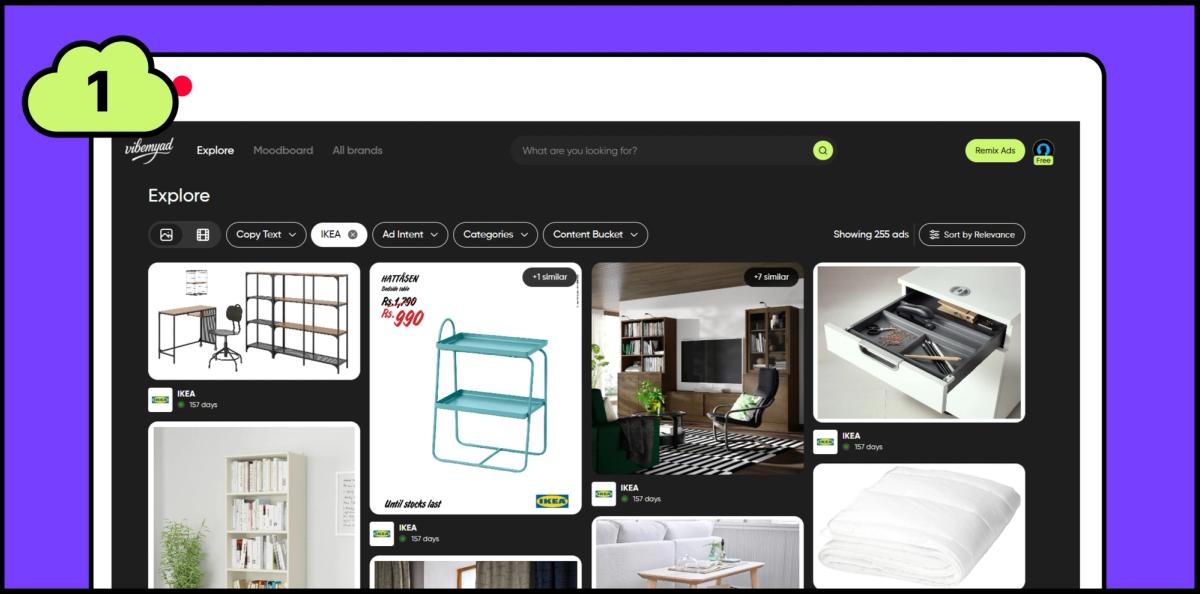
Step 1 : Choose inspiration from ad library
This is where AI does the heavy lifting. Instead of manually adding snowflakes, changing colors, and redesigning everything, you're about to watch it happen automatically.
After clicking 'Remix,' you'll see the Vibemyad creation studio. On the right side, you'll notice 'Prompt Presets'—a dropdown menu with dozens of themed options.
Finding Christmas Mode:
Step-by-Step:
Click the "Prompt Presets" dropdown
Scroll to "Seasonal Themes"
Select "Christmas Mode"
What Happens When You Select It:
The moment you click 'Christmas Mode,' Vibemyad's AI analyzes your base ad and applies Christmas-specific transformations:
Visual Transformations:
• ✅ Color Palette Shift: Adds red, green, gold, and white accents
• ✅ Background Elements: Introduces festive elements (snow, bokeh lights, ornaments)
• ✅ Lighting Adjustment: Adds warm, cozy glow characteristic of holiday imagery
• ✅ Seasonal Props: Subtly adds gift boxes, ribbons, or festive patterns
Text Transformations:
• ✅ Headline Adjustment: Suggests gift-focused variations
• ✅ Urgency Elements: Adds delivery deadline suggestions
• ✅ Holiday Messaging: Incorporates festive language
• ✅ CTA Optimization: Christmas-appropriate calls-to-action
Layout Optimization:
• ✅ Focal Point Preservation: Keeps your product prominent
• ✅ Christmas Elements: Adds without overwhelming
• ✅ Text Readability: Ensures headlines pop against festive backgrounds
• ✅ Platform Specs: Maintains proper dimensions
Understanding the Preset:
Christmas Mode is essentially a sophisticated AI prompt that tells Vibemyad exactly how to transform your ad for the holidays. Behind the scenes, it's applying dozens of design principles, but you don't need to know any of that. Just click and watch.
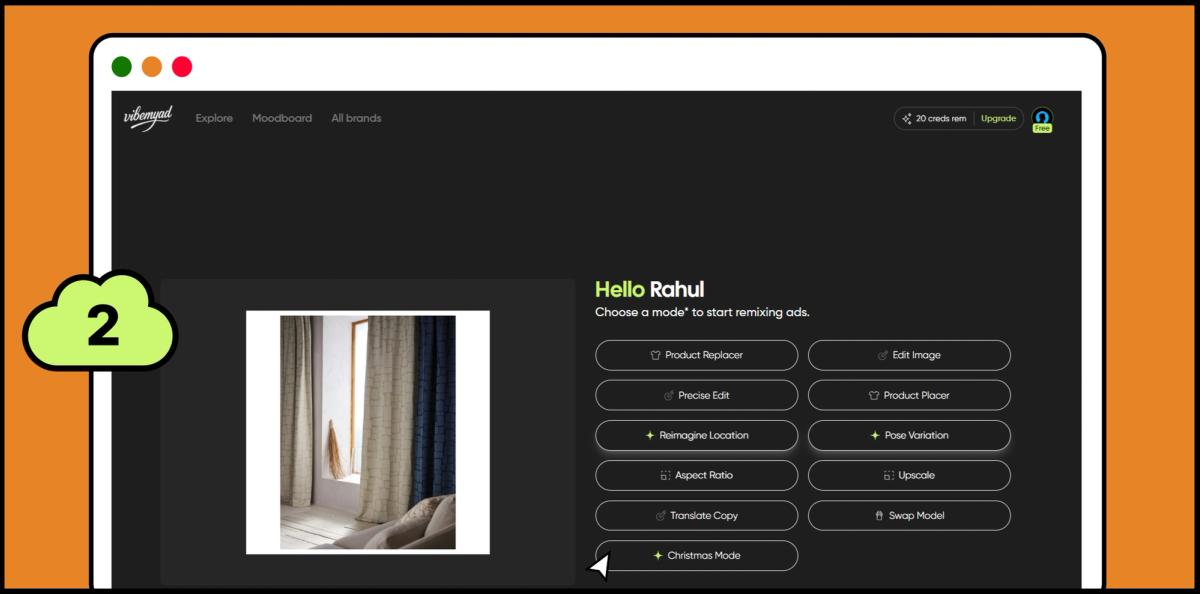
Step 2: Select Christmas Mode
Christmas Mode handles 90% of the transformation automatically. But if you have specific requests, this is where you add them.
When to Add Custom Instructions:
Common Scenarios:
Scenario 1: Specific Text Changes If you want to override the AI's headline suggestion with your own copy.
Example Instructions:
• "Use headline: 'Santa's Favorite Skincare Gift'"
• "Add subheading: '20% Off + Free Gift Wrapping'"
• "Include 'Order by Dec 15' deadline"
Scenario 2: Visual Tweaks If you want specific Christmas elements or adjustments.
Example Instructions:
• "Add more gold accents, less green"
• "Include subtle Christmas lights in background"
• "Make snowflakes smaller and more subtle"
Scenario 3: Brand Guidelines If you need to maintain strict brand consistency.
Example Instructions:
• "Use brand colors: #B91C1C (red) and #F4F4F5 (white)"
• "Keep product on white background, add Christmas border only"
• "Maintain minimalist aesthetic, subtle Christmas touches only"
We are giving the playground link to play around as well. Just click on the image or this link to access the playground.
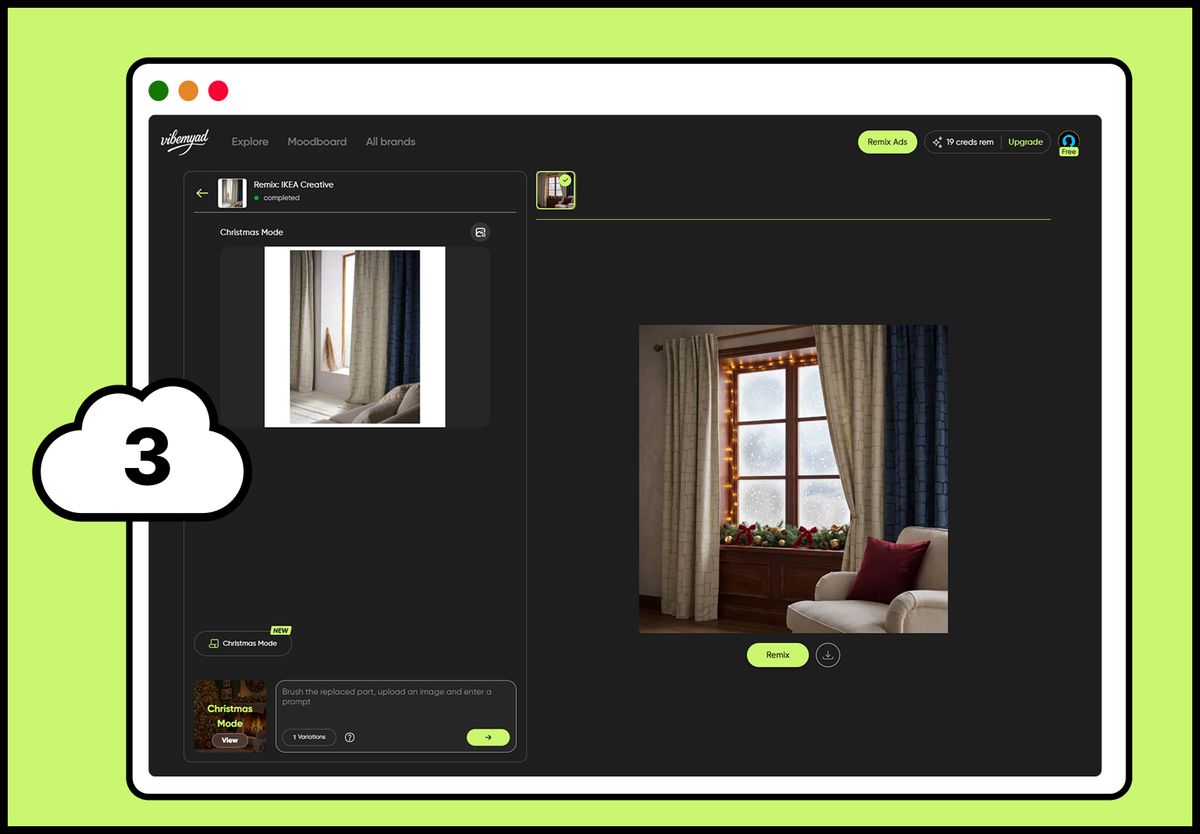
Step 3: Use custom instructions and click on generate button
The Error: Using vague messaging that could apply to any season.
Bad Example: "Happy Holidays! Shop our sale!"
Good Example: "The Gift Dad Will Actually Use: Premium Grilling Set, 30% Off 🎁"
The Fix: Be specific about the gift, the recipient, and the value.
The Error: Running Christmas ads without mentioning delivery cutoff dates.
The Fix: Prominently display order-by dates in every ad.
Where to Include:
• Headline or subheadline
• Ad copy body
• Landing page banner
Action: Add "Order by Dec [X]" to all Christmas ads.
The Error: Treating Christmas like any other sale with hard-sell tactics.
Bad Example: "MASSIVE BLOWOUT SALE!!! BUY NOW!!!"
The Fix: Balance promotional messaging with warm, festive sentiment.
Good Example: "Make Their Christmas Special: 25% Off Our Best Sellers 🎄"
You now know exactly how to create professional Christmas ads in under 5 minutes using AI. No designer. No photoshoot. No weeks of waiting.
The Process Recap:
Choose your base ad (existing ad, competitor inspiration, or template)
Select Christmas Mode (AI applies festive transformations automatically)
Generate (with optional custom instructions)
Your Action Plan:
Today: Create your first 3 Christmas ad variations using Vibemyad This Week: Export for all platforms, launch campaigns Next 4 Weeks: Run, test, optimize through peak Christmas shopping season
The window is closing. Every day you wait is a day your competitors are capturing Christmas shoppers.
The best marketers don't just create ads—they create them fast and test relentlessly. Your competitive advantage comes from speed and iteration.
Ready to create your first Christmas ad?
👉 Start Your Free Vibemyad Trial - No Credit Card Required
Create unlimited Christmas ad variations. Export for all platforms. Launch campaigns today, not next week.
Time to make this your best holiday season yet. 🎄
Get notified when new insights, case studies, and trends go live — no clutter, just creativity.
Table of Contents


Ananya Namdev
Content Writer, Vibemyad


Rahul Mondal
Product, Design and Co-founder, Vibemyad


Arpita Mahato
Content Writer, Vibemyad